Evaluating Watercolor Winter Pinecone Graphics for Commercial Use
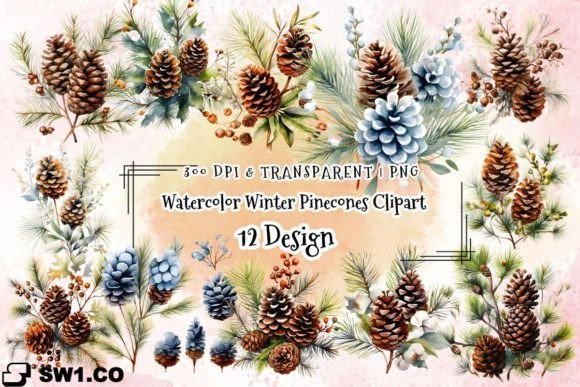
When preparing a seasonal collection for my Etsy shop or a print-on-demand store, my first step is to evaluate new design assets with a practical, business-minded eye. Let’s examine the Watercolor Winter Pinecone Arrangement from that perspective.
First Impression and Market Niche
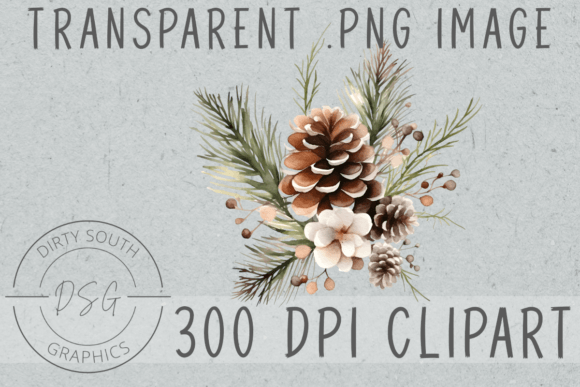
The immediate feeling from this watercolor pinecone illustration is rustic elegance. It has a handmade, decorative quality that feels festive without being overtly Christmas-specific. This opens up its niche appeal beyond just holiday items, extending into winter-themed home décor, cozy branding, and feminine rustic designs. I can see it attracting customers who appreciate a natural, artistic look—think small business owners crafting winter wedding invitations, crafters making seasonal planner stickers, or content creators needing winter-themed blog graphics.
The color palette and soft washes suggest a premium, artistic mood. This isn't a bold, cartoon clipart; it’s a detailed illustration that could elevate a product’s perceived value. For a seller, this means it can help position your digital downloads or merchandise as higher-quality within the creative marketplace.
Practical Application in Product Creation
As a PNG image with a transparent background and at least 2500 pixels on one side, this graphic design asset is ready for commercial use in numerous formats. The high resolution and color depth make it suitable for sublimation designs and high-quality printable wall art. Here’s how I would test it across potential products before publishing any listings.
Primary Product Categories
Given its transparent background, this pinecone arrangement is immediately usable for:
- Printable Designs: Winter greeting cards, invitation templates, and art prints.
- Sublimation Designs: T-shirt graphics, mug designs, and tote bag prints where the large size ensures crisp detail.
- Digital Product Bundles: As a standalone piece or part of a larger winter clipart or illustration bundle.
- Template Integration: Embedding it into Canva templates for social media graphics or into pre-made layouts for scrapbooking kits.
Testing for Professional Product Presentation
A key part of my process is testing how an asset like the Watercolor Winter Pinecone Arrangement performs in real selling scenarios. This goes beyond just liking the art.
Mockup and Thumbnail Appeal
I would first place the PNG on various product mockups—a mug, a framed art print, a t-shirt—to see how it scales and if the details remain clear. Crucially, I’d preview it as a marketplace thumbnail. Does the intricate watercolor detail get lost when the image is small? This affects click-through potential. I’d also test it on both white and dark backgrounds to check contrast, ensuring it works for diverse packaging design or promotional visuals.
Building Collections and Branding
This illustration can anchor a seasonal collection. By pairing it with complementary graphics—perhaps simple snowflake icons or a rustic script font—you create a cohesive brand identity for your winter digital downloads. This consistency builds customer trust and makes your shop look more professional. It's strong enough for large product previews and decorative layouts in listing images.
Where This Asset Works Best and Considerations
Understanding a graphic’s strengths and limitations prevents costly listing errors.
Optimal Use Cases
- Large Format Prints: The 300 dpi and size make it ideal for printable wall art or tumbler wraps.
- Themed Bundles: It’s a perfect centerpiece for a winter-themed digital paper pack or sticker collection.
- Merchandise Graphics: On light-colored apparel or home goods via print-on-demand, the subtle colors will shine.
- Visual Storytelling: In blog graphics or social media templates promoting a “cozy winter” brand aesthetic.
Careful Application Notes
Because this is a PNG and not an SVG or cut file, there are specific areas where it requires careful use:
- Not for Cutting Machines: This is not a CUT file. Do not attempt to use it for detailed Cricut projects like intricate sticker outlines where clean cutting lines are essential.
- Small Details: The delicate watercolor strokes might blur or vanish if used for tiny planner sticker details.
- Crowded Layouts: In text-heavy templates or crowded thumbnails, its elegance could become visual clutter.
- Low-Resolution Products: Always verify the output resolution for final prints to maintain its premium look.
Final Seller Checklist Before Listing
Before I’d sell any finished product featuring the Watercolor Winter Pinecone Arrangement, I’d run this quick, practical checklist:
- Confirm Licensing: Double-check the commercial license terms for the original asset.
- Test Print Colors: Print a sample, even on a home printer, to see if the sublimation-ready colors translate as expected.
- Verify PNG Transparency: Open the file in a design program and place it over different colors to ensure the background is truly clean.
- File Organization: If bundling it, organize files clearly for customers—label it appropriately as a high-res PNG illustration.
- Font Pairing Test: Experiment pairing it with different font styles—a sleek sans serif for modern contrast, a script font for rustic elegance, or a serif for traditional invitations—to see what enhances the final product mockup.
- Market Preview: Finally, visualize it in the context of a real Etsy product listing or Creative Fabrica shop page. Does it help tell a story and elevate the collection’s overall value?
In summary, the Watercolor Winter Pinecone Arrangement is a versatile and professionally-executed illustration for sellers targeting a rustic, elegant winter niche. Its high-resolution PNG format makes it a solid foundation for sublimation designs, printable art, and template integration, provided you respect its limits regarding cutting projects. By testing it thoroughly across mockups and presentations, you can confidently integrate it into your digital product lineup, strengthening your seasonal offerings and brand consistency.